Content creation
⟳Cross-post Remixer✂AI Clipper✦Hook Generator¶Caption Fit Checker✧AI Script Writerin app11 free tools. Zero signups. Your files never leave your browser.Open the Viral Lab →
Looking for an OpusClip alternative? We compared 10 AI clipping tools on free limits, watermarks and what four one-hour episodes a month really cost.
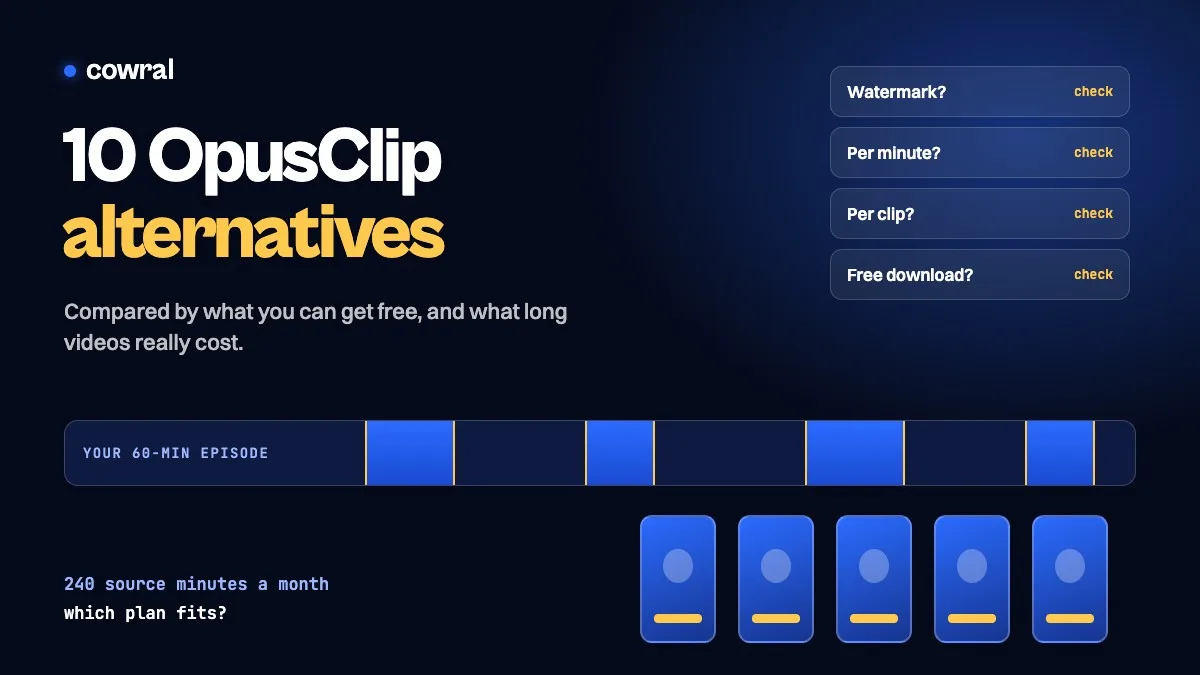
The right OpusClip alternative depends on why you’re leaving. If it’s the watermark on the free plan, start with a tool that lets you test clean exports. If it’s cost, work out what your own monthly footage would burn through, because these tools count usage in very different ways. And if you already record in Descript or Riverside, you may already be paying for a clipper.
OpusClip’s own model is simple enough. Its help center says clipping costs 1 credit for each minute of the video you import, so a 30-minute video uses 30 credits. The free plan gives you 60 credits a month, with a watermark, no editing, and clips you can’t export after 3 days.

Key takeaways
We should be upfront about what this is and isn’t. We read each company’s pricing and product pages on November 4, 2026, and the screenshots below come from those pages. We didn’t run footage through any of these 10 tools for this article, so this isn’t a quality ranking, and we won’t pretend to know which one picks the best moments on your videos. The testing section after the list shows you how to find that out in about an hour.
The list is ordered by what you can get without paying, because that’s what you can check for yourself today. We make number one, so weigh that accordingly.
Prices change often, and OpusClip’s changed between two page loads on the day we checked ($15 on one load and $12 on another for Starter, and $14.50 and $11.50 a month for Pro billed yearly). Treat every number as a snapshot and confirm it before you buy.
Most roundups list starting prices, which tells you little, since the cheapest plan may not hold your footage. So we used one example: a weekly one-hour podcast or stream, or 240 source minutes a month. The table shows the lowest listed plan whose allowance covers that, with OpusClip first for comparison and the rest in the same order as the list below.
| Tool | Lowest plan that fits | Price shown | How it’s counted |
|---|---|---|---|
| OpusClip (for comparison) | Pro | $29 monthly, or $11.50 to $14.50/mo billed yearly | 300 credits a month, 1 credit per minute |
| Cowral | Free account | $0 | 1 video a day, up to 5 clips each |
| 2short.ai | Lite | $9.90/mo | 5 hours of analysis a month |
| Vizard | Creator | $14.50/mo billed yearly | 7,200 credits a year, 1 credit per minute |
| Quso | Essential | $39/mo | 300 credits a month, about 1 credit per minute |
| Kapwing | Not clear | Pro is $16/mo billed yearly | 1,000 credits a month; the page doesn’t say what a clip job uses |
| Descript | Hobbyist | $16/mo billed yearly, $24 monthly | 10 media hours a month |
| CapCut | Not clear | Shown in local currency | The clip tool’s page doesn’t state a usage limit |
| Klap | Basic | $14.50/mo billed yearly, $29 monthly | 100 clips a month, any source length up to 3 hours |
| Submagic | Not clear | Business is $41/mo billed yearly | 30-minute limit per video on its top listed plan |
| Riverside | Pro | $24/mo billed yearly | Magic Clips listed on the plan, no AI credits needed |
Klap’s row needs a second look: 100 clips across four episodes is 25 clips an episode. If you only post a few clips from each episode, a clip-based plan can go further than a minutes-based one. If you want every possible clip, it can run out faster.
This one is ours. The Cowral Clipper lets you upload a long video and watch watermarked previews without an account, once a day. A free account downloads the clips clean: 1 video a day, up to 120 minutes and 4 GB, and up to 5 clips from each. Each clip is a 1080×1920 MP4 with word-by-word captions, a 1 to 100 score, a title and a suggested post caption. Pro is $19 a month and goes up to 10 videos a day.
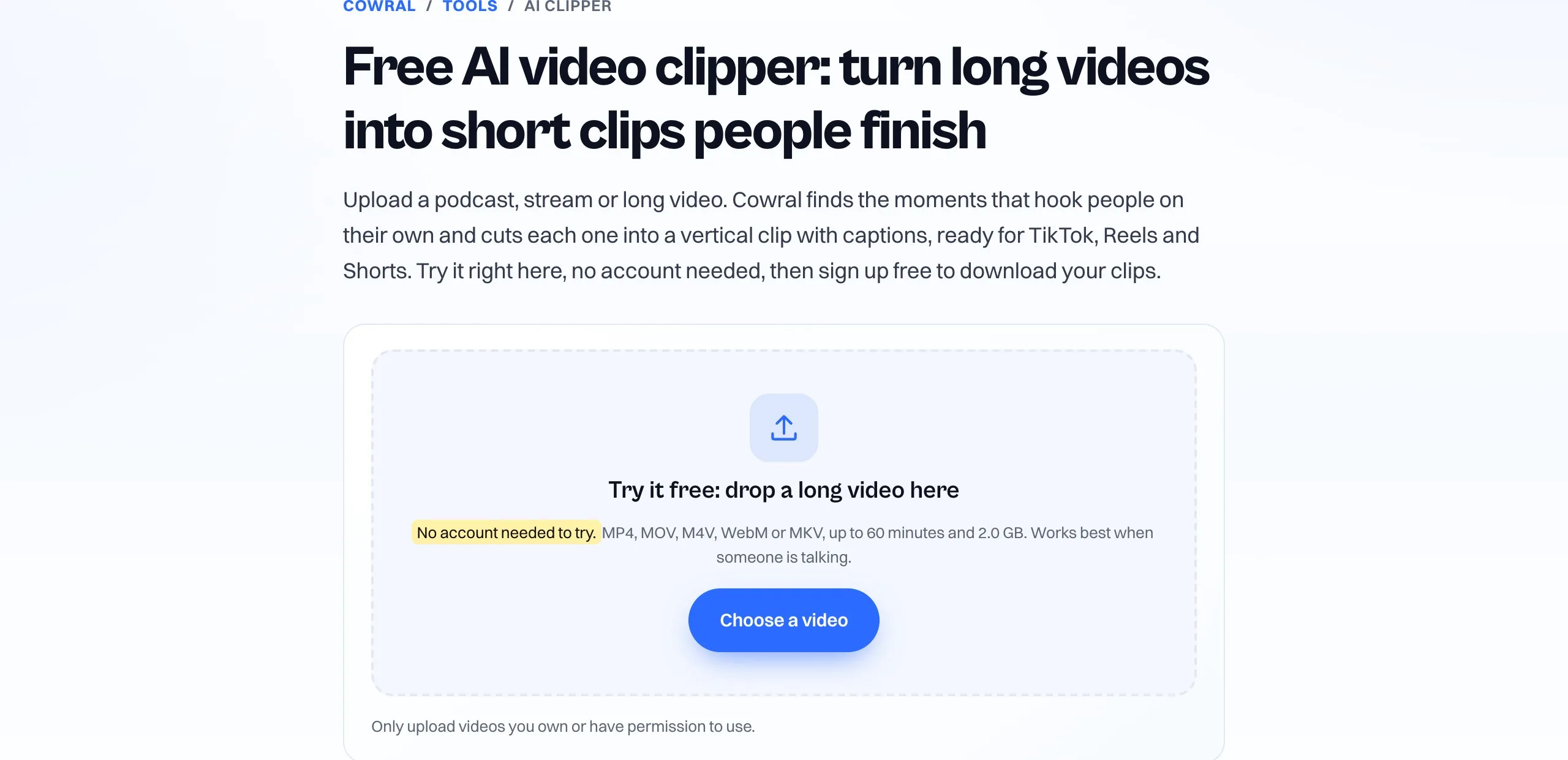
Now the limits, because they’re real. You can’t paste a YouTube link, only upload a file. Wide videos sit over a blurred copy of themselves rather than getting cropped to follow the speaker, which some people will prefer and others won’t. It doesn’t post or schedule for you, you get 5 clips per video at most, and captions look best in languages written in the Latin alphabet. Clips are deleted after 7 days. If you want a full editor and auto-posting, the tools further down do more.
2short.ai has the lowest listed paid price in our table, and it’s built around YouTube. Its pricing table lists a free Starter plan with 30 minutes of AI analysis a month, though another line on the same page says 15, so expect the lower number until you see otherwise. Lite is $9.90 a month for 5 hours, and Pro is $19.90 for 15 hours. It says all plans get all features, and it advertises 1080p exports without watermarks.
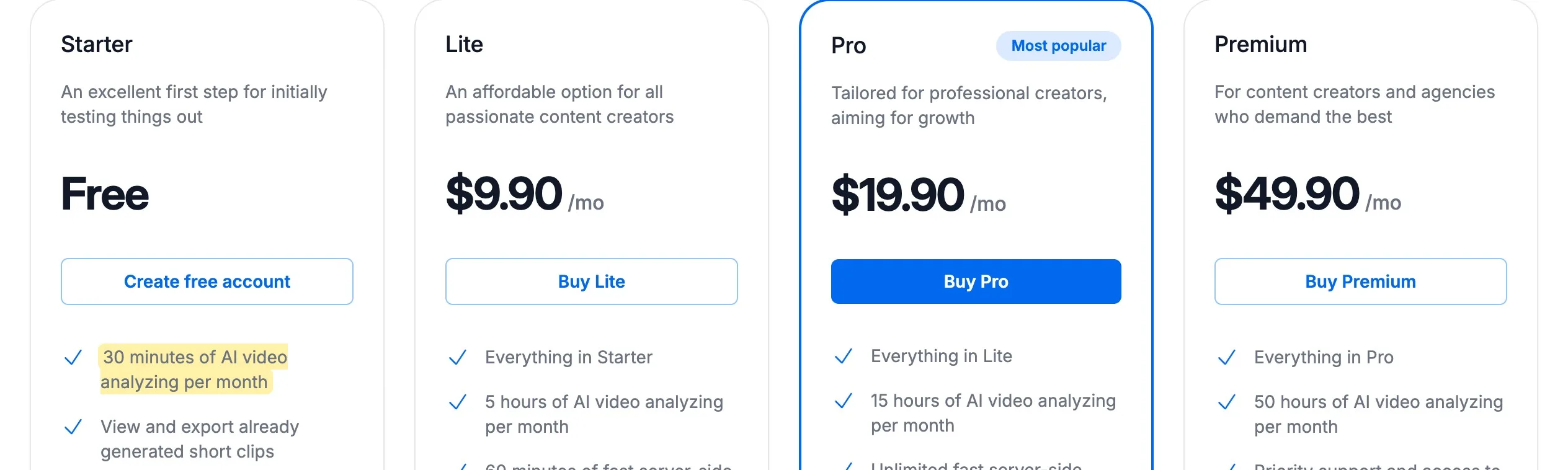
The catch is the workflow. The site’s getting-started answer is built around pasting a YouTube link, and imports from Google Drive and public URLs start on the Lite plan. It also lists 60 minutes of fast server-side exports on Lite, with unlimited ones starting at Pro. If you don’t publish long videos to YouTube first, this probably isn’t your tool.
Vizard is packaged much like OpusClip: 1 credit per minute, and a free plan with 60 credits a month. The free plan allows uploads up to 60 minutes and 1 GB, exports in 720p, and keeps videos for 3 days. It’s a useful test, since its full editor is included. Paying for Creator removes the watermark and adds 4K exports and scheduling.
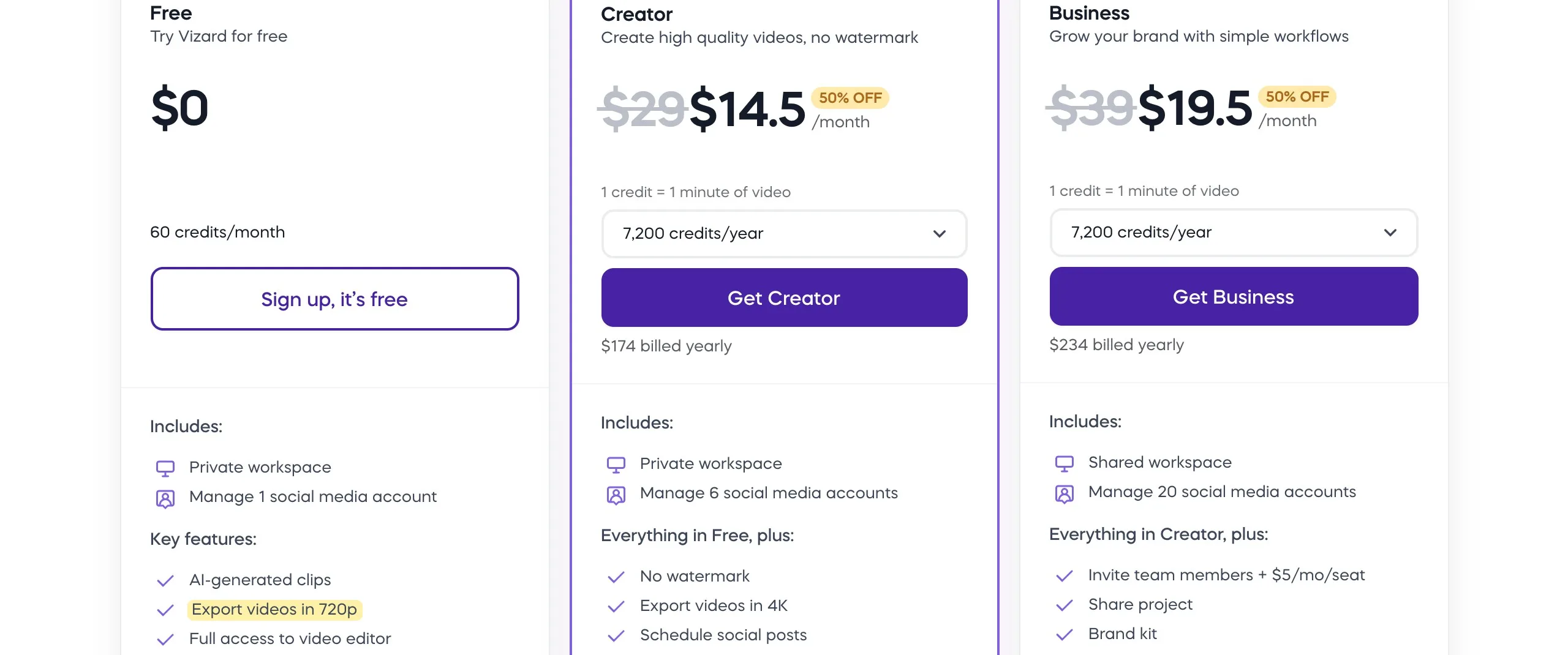
Creator shows $14.50 a month billed yearly ($174), crossed out from $29, with 7,200 credits a year. That covers 240 minutes a month, but only if you’re happy to commit for a year.
If you remember Vidyo.ai, this is what it became: Quso’s pricing page tells Vidyo.ai customers their plan and pricing haven’t changed. The free plan gives you 75 credits a month, a little more than OpusClip’s 60, with a Quso watermark on 720p exports and 7 days of data retention.
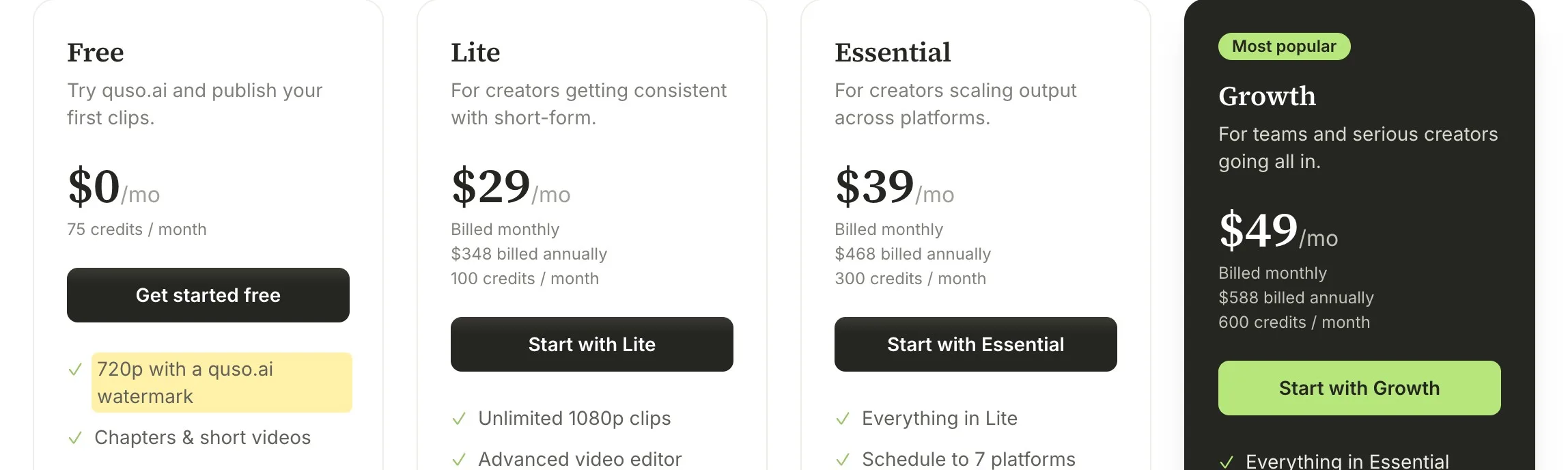
Paid plans are where to read carefully. Lite is $29 for 100 credits, and one credit is roughly one minute, so a single long stream could use most of it. Scheduling to 7 platforms and filler removal begin on Essential at $39. Quso makes more sense if you want clipping, scheduling and analytics in one subscription than if you only want clips.
Kapwing is a general online video editor with an AI Clip Maker inside it, which is the appeal: you can fix a clip by hand in the same place. Its FAQ says you can try the Clip Maker for free, with limits on features and video length and a watermark on exports. The free plan also caps exports at 4 minutes and 720p.
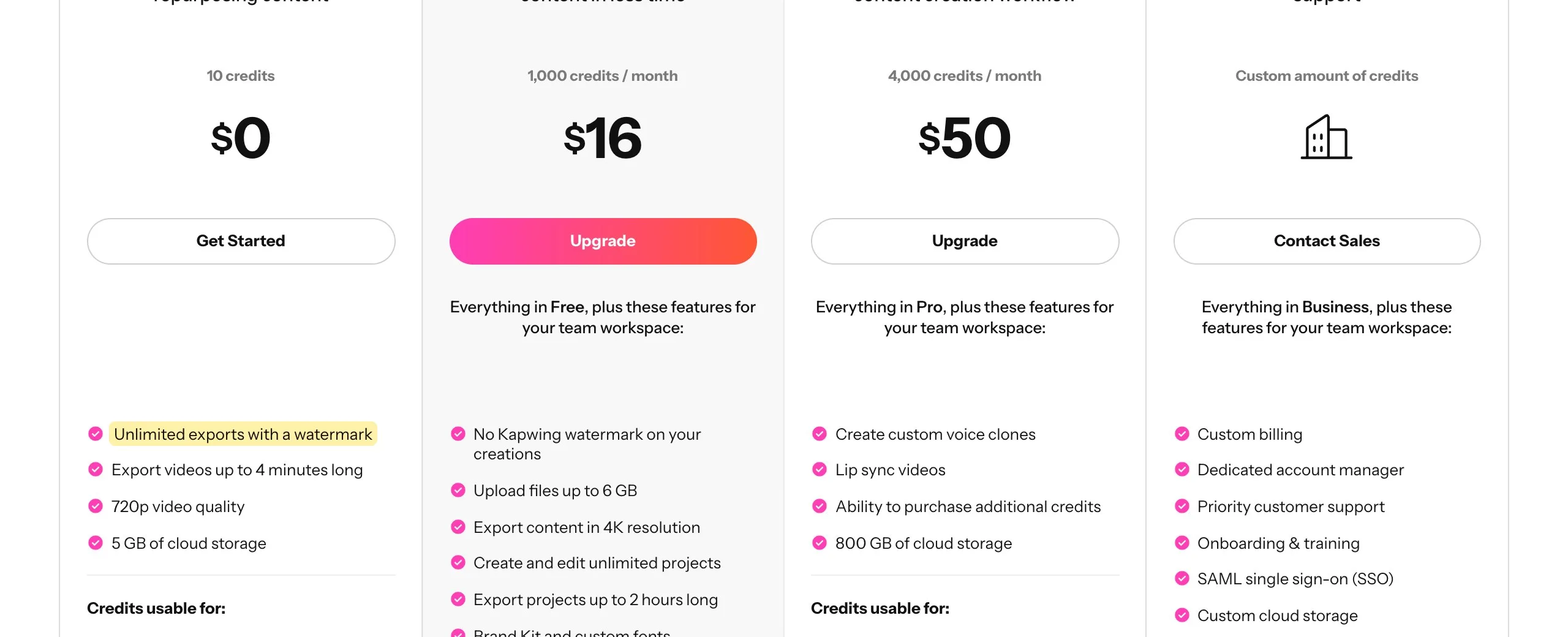
Pro is $16 a month billed yearly, with 1,000 credits a month. We couldn’t find what one Clip Maker run uses, so test it on a real file before you estimate your bill. Kapwing says its clipper does best on videos longer than 10 minutes.
Descript isn’t a clipper first. It’s an editor where you edit video by editing a transcript, and Create Clips is one of its AI tools. If your long videos need cleaning up anyway, you might get clips and the edit from one subscription. The free plan has 60 media minutes a month, 720p exports and limited use of the clip feature.
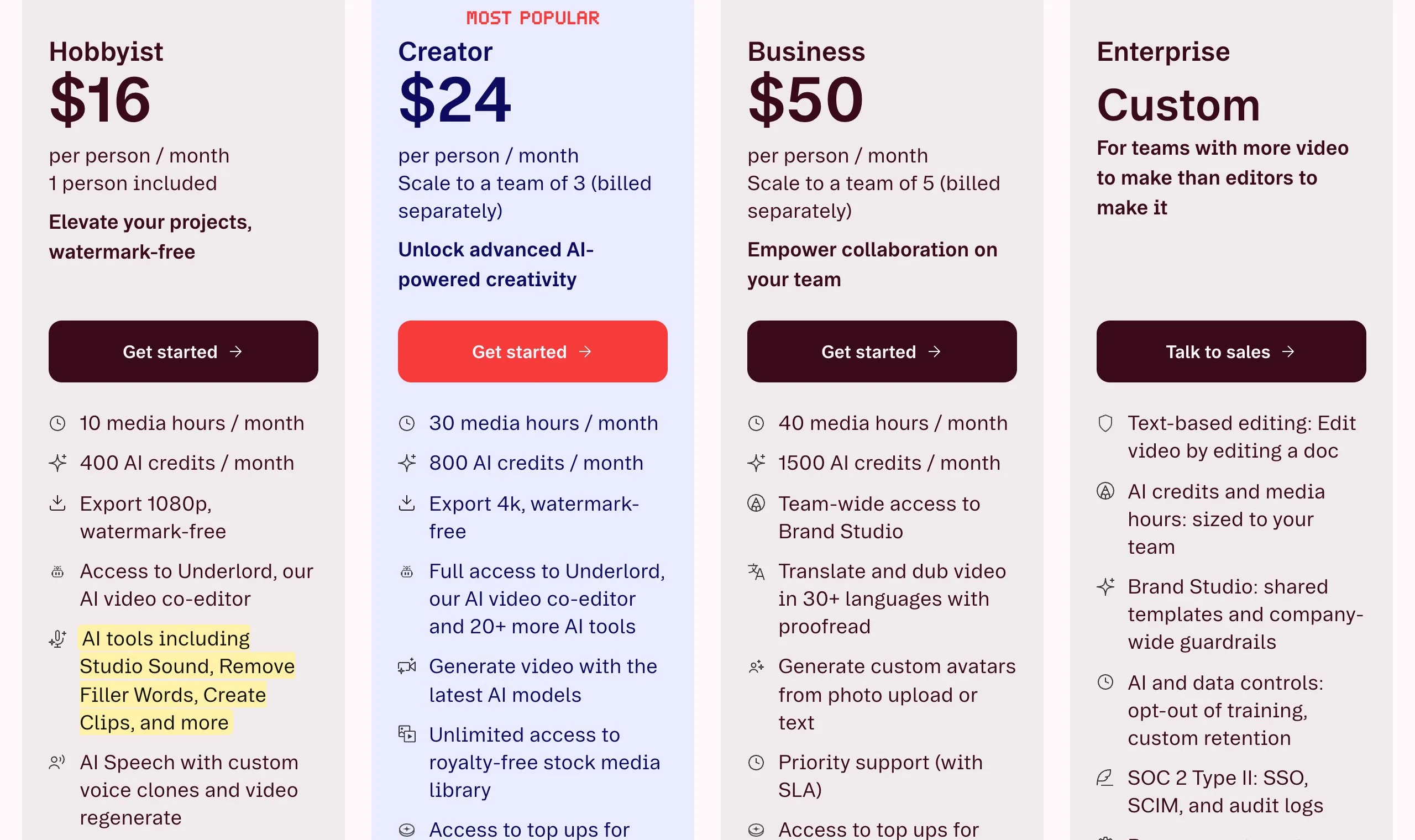
Hobbyist is $16 a month billed yearly or $24 monthly, with 10 media hours and 400 AI credits. The trade-off is time: you’re learning an editor, not pressing one button. If you only want clips and never touch the long version, a dedicated clipper is less to learn.
CapCut’s long-video-to-shorts tool cuts clips, reframes from 16:9 to 9:16 with subject tracking, and generates captions you can edit. Its page says the tool makes clips “without watermarks,” and if you already edit in CapCut, this may be all you need. Its steps list uploading from cloud storage, Google Drive or Dropbox.

What we can’t tell you is the limit. The tool’s page doesn’t state how much you can clip for free, and the pricing page shows prices in local currency, so check it for the price where you live. It’s worth a try. Just check that nothing you need sits behind Pro before you build a routine around it.
Klap has the most different pricing model here: “Only pay for clips you generate.” Source length doesn’t count against your plan, as long as the video is no longer than 3 hours, so a three-hour stream costs the same to process as a 20-minute video. Every plan includes scheduling and publishing, unlimited social accounts, analytics and an editor.
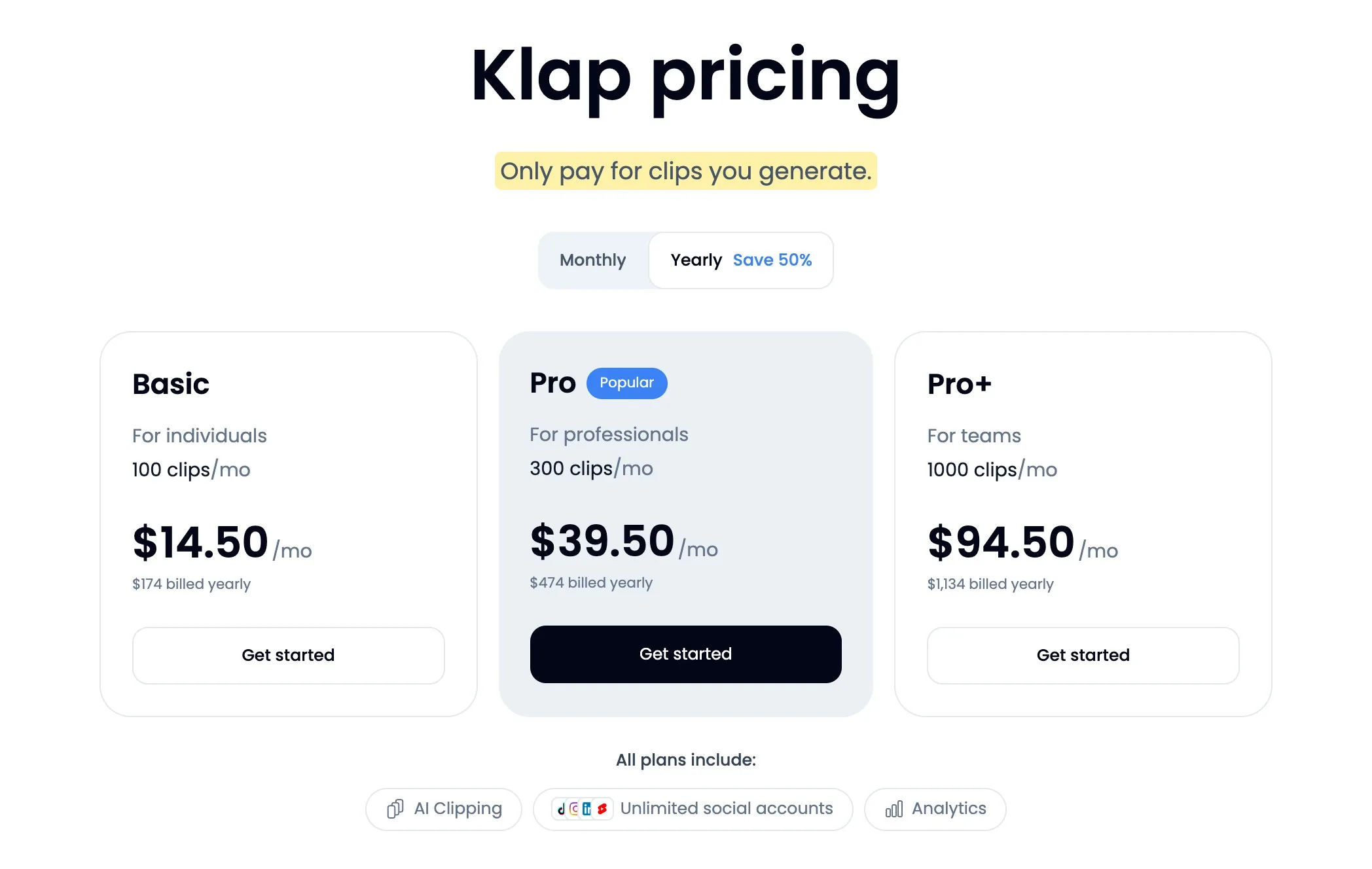
It sits low on this list only because of how we ordered it. The free trial covers 1 video that you can preview and edit, but downloading or posting needs a paid plan. Basic is $29 a month, or $14.50 billed yearly, for 100 clips. If your source videos run for hours and you only need a few clips from each, the math can work in its favor.
Submagic offers AI captions, and its Magic Clips feature takes a YouTube URL or an uploaded file. The site offers a free try with no card. It says it can make 20 or more clips from one long video, along with AI captions, audio cleanup and auto zoom.
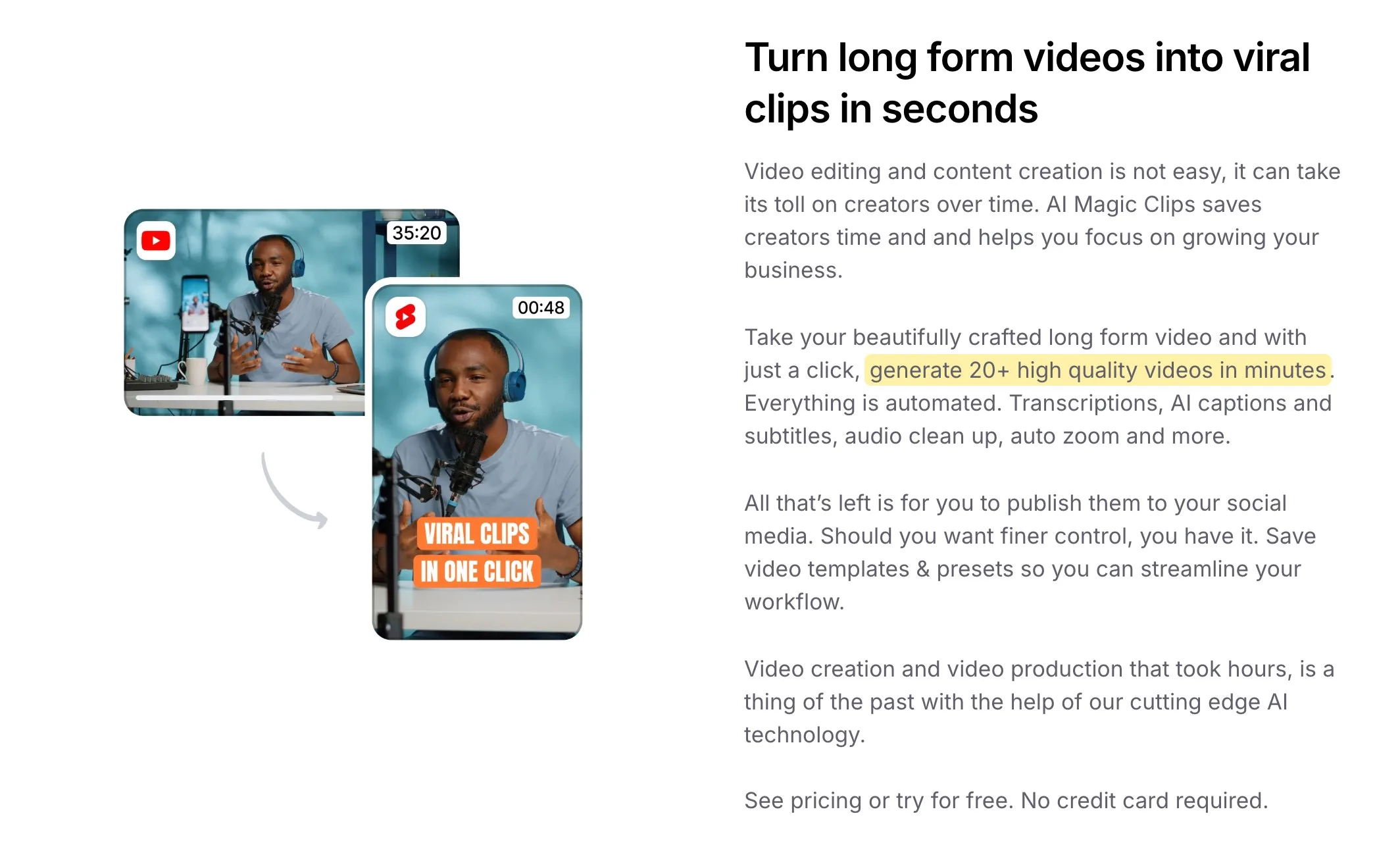
Read the plan table before you commit. It lists a video duration limit of 2 minutes on Starter ($12 a month billed yearly), 5 on Pro ($23) and 30 on Business ($41), and it mentions separate Magic Clips limits only on the custom plan. We couldn’t tell from the page how those limits apply to long uploads, so ask or test with your real file length. If you mostly edit short videos already, it may fit better than a long-video tool.
Riverside belongs on this list if you record there. It’s a recording studio first, with Magic Clips on its plans. Its pricing page lists a 14-day free trial, and Pro is $24 a month billed yearly. A note on that page says core AI features, including Magic Clips, don’t use AI credits.
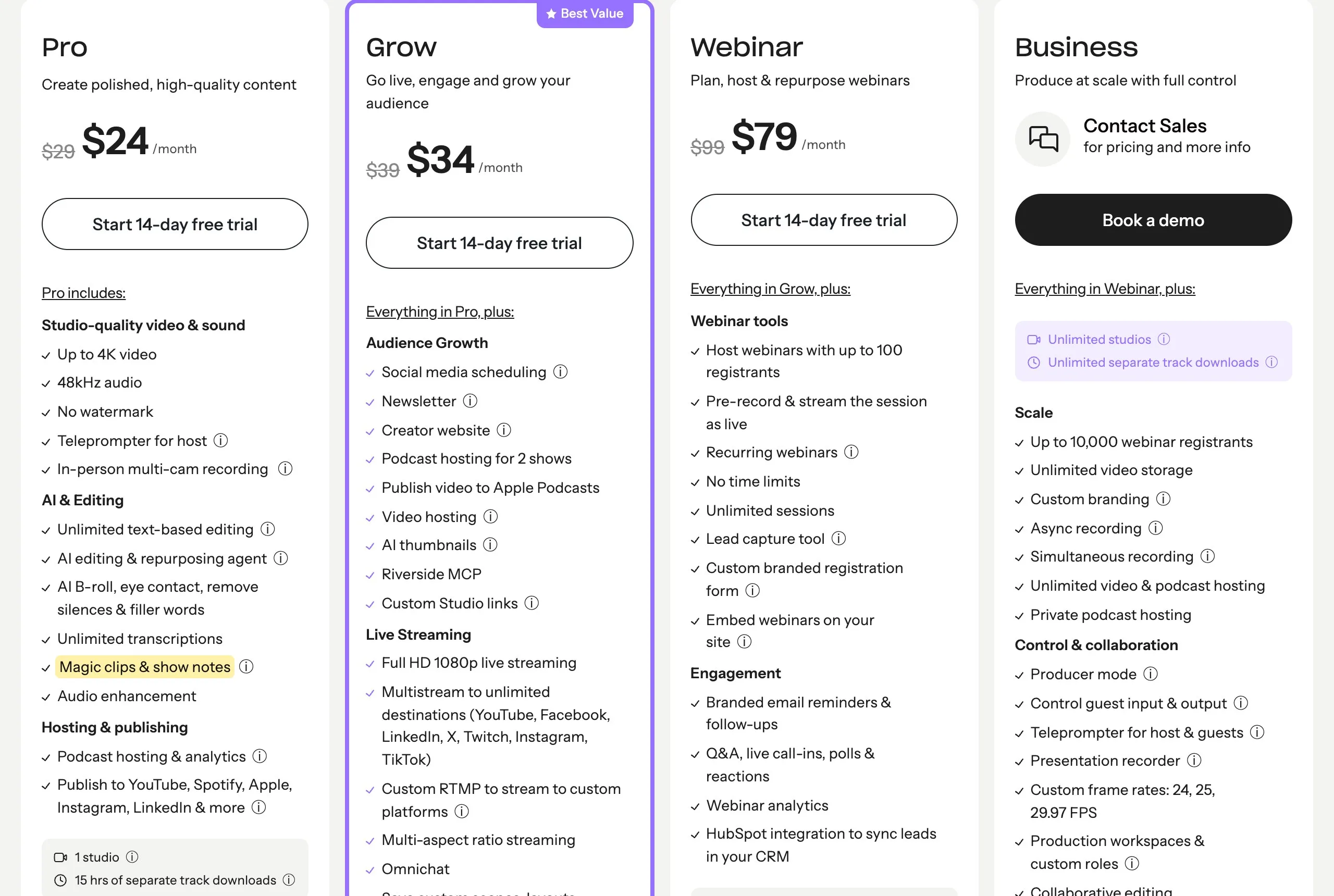
Paying for a recording studio just to get clips doesn’t make much sense. But if you’re already paying for one elsewhere and using a separate clipper, moving both to Riverside could replace two bills with one. The crossed-out monthly price for Pro showed $29 on one page load and $35 on another, so check it at checkout.
We left out Munch. Its pricing page now describes Munch Studio, a wider social content service starting at $38 a month billed yearly, with video repurposing as one part of it. It may suit a business that wants the whole package, but it isn’t a like-for-like OpusClip swap.
A pricing page can’t tell you which tool picks good moments, and neither can a roundup, including this one. So pick two or three from the list and give them the same file. Choose a video that’s hard on purpose: two speakers, a few names or brand terms, and a story that takes a while to pay off.
Then check the clips for four things:
Be careful with virality scores. OpusClip, Klap and Cowral all give clips a score, and it’s a model’s estimate, not a prediction you can bank on. Post a few clips the score likes and a few it doesn’t, then look at your retention numbers, which tell you what viewers actually did.
Two more things before you post. Only clip videos you own or have permission to use, even when a tool will accept any link. And if you’re putting the same clip on several apps, read our guide to cross-posting without getting held back, since a watermark from a clipping tool can matter there too. For the first three seconds of each clip, our Reels hook formula is a good place to start.
Maybe not. OpusClip has real strengths: its paid plans include AI captions in 20+ languages, auto-posting and a text-based editor, and Pro adds B-roll, a scheduler and exports to Premiere Pro and DaVinci Resolve. If you clip a couple of hours a month and the output already works for you, saving a few dollars isn’t worth rebuilding your routine.
Switching makes sense when the math stops working, usually because your source videos are long, or when the clips keep needing so much fixing that you’d be better off with a real editor.
It has a free plan with 60 credits a month, which is about 60 minutes of source video. Clips carry a watermark, there’s no editing, and you can’t export them after 3 days.
It depends on what you need to test. Cowral’s Clipper gives a free account clean downloads of up to 5 clips from one video a day, though it has no auto-posting. Vizard’s free plan includes its full editor, with 720p exports. CapCut’s clip tool is also worth trying, but its page doesn’t state the limits.
For long source videos, compare Klap, which charges by clips rather than source minutes, with 2short.ai’s Lite plan at $9.90 for 5 hours. Klap’s Basic plan is $14.50 a month billed yearly or $29 monthly, and it accepts videos up to 3 hours. If 5 clips per video is enough, Cowral’s free account takes one video a day, up to 120 minutes, at no cost.
Not on OpusClip, Vizard, Quso or Kapwing’s free plans. All four reserve watermark-free exports for paid plans. Among the tools here, 2short.ai advertises exports without watermarks, CapCut’s tool page says the same, and Cowral’s clean downloads need only a free account.
Some do. Submagic and 2short.ai both take YouTube links. OpusClip lists public MP4 links and auto-import from a verified YouTube account on its paid plans, and Cowral’s Clipper takes file uploads only. Whichever you use, stick to videos you own or have permission to use.
Yes. Quso’s pricing page addresses people coming from Vidyo.ai and says their plan and pricing haven’t changed.
All pages read on November 4, 2026.

Olu Sam is an SEO expert and social media content creator who built over 50K followers across his social media pages in less than a year of creating content.
LinkedIn ProfileHow we research and fact-check YouTubeYouTube Shorts monetization in 2027: the new 10M view ruleFrom February 1, 2027, Shorts revenue needs 10 million qualified views every 90 days, and joining YPP gets harder.
 YouTubevidIQ vs TubeBuddy in 2026: which one is worth paying for?vidIQ vs TubeBuddy, compared on price, AI credits, A/B testing and Shorts, using each company's own pages.
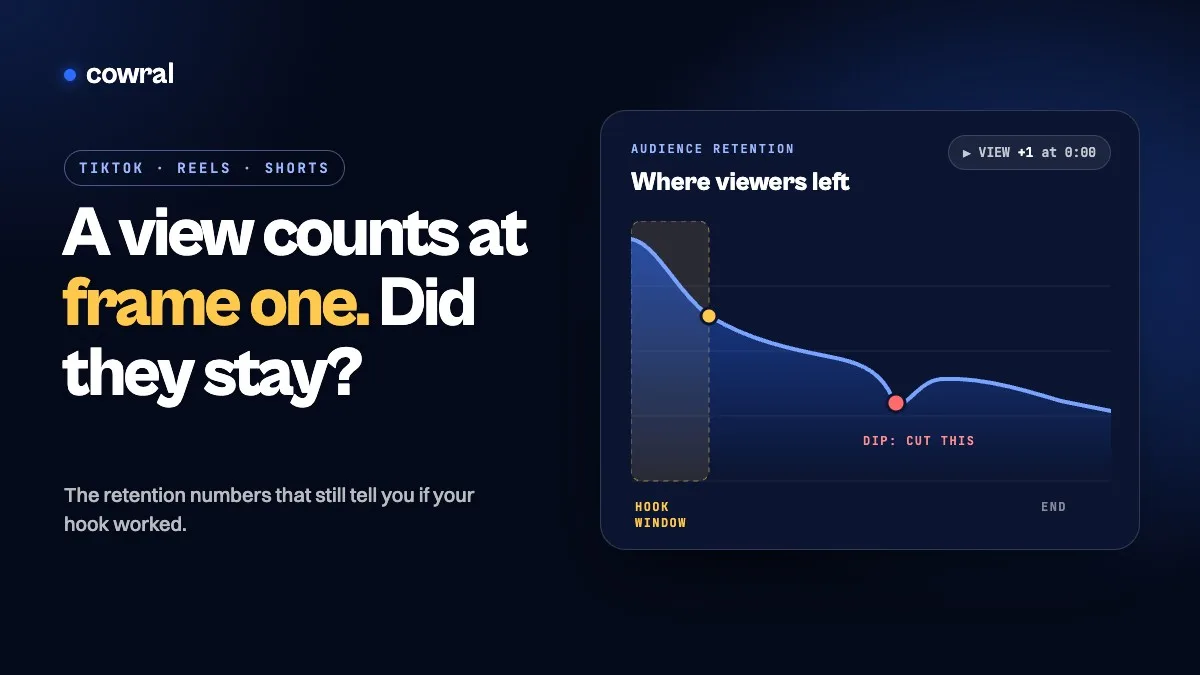 YouTubeYouTube now counts a view the second a video starts. Here's the number that tells you if your hook workedSince August 24, 2026, YouTube counts a view the moment any video starts to play. Here's which retention numbers on YouTube, TikTok and...